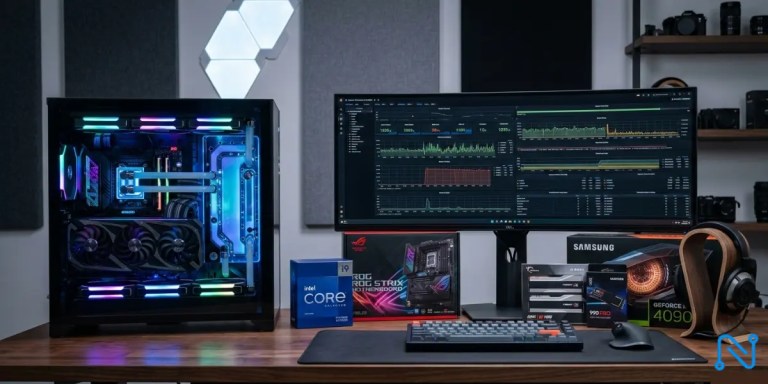
Premium PC Parts for Content Creators are essential if you’ve ever waited 30 minutes for a 4K timeline to render or watched your system freeze mid-export. Naturally, content creation moves fast, audiences expect top-tier quality, and algorithms reward consistency. However, your workflow is only as strong as your computer components.
For creators involved in video editing, 3D rendering, streaming, podcast production, AI art generation, or professional photography, investing in premium PC parts for content creators is not just optional it’s strategic.
In this guide, you’ll learn how to build or upgrade a high-performance PC that not only accelerates productivity but also improves export speeds, enhances stability, and ultimately boosts your revenue.
Explore our guide to building a smoother, faster content creation PC
Key Takeaways
- High core count CPUs and RTX class GPUs significantly reduce rendering time and improve multitasking performance.
- NVMe Gen4 SSD storage dramatically speeds up project loading and export workflows.
- Investing in premium RAM and cooling protects long term stability and component lifespan.
- Regional price differences can impact buying strategy, so comparing global options matters.
- Bundling components from trusted retailers like Nowistech, Amazon, and Newegg reduces compatibility risk.
If you are ready to compare the most recommended workstation grade components for creators, explore the curated bundles and live pricing updates available through Nowistech’s premium workstation collection.
Why Do Premium PC Parts for Content Creators Matter Today?
Content creation is no longer casual. It is business.
According to Statista, the global creator economy continues to expand rapidly, with millions monetizing content across platforms and generating billions in annual revenue (Statista, 2024). As competition increases, performance standards rise.
Furthermore, Adobe reports that video and digital media workloads are becoming increasingly resource intensive due to AI based features such as generative fill, auto color correction, and advanced rendering pipelines (Adobe Digital Trends Report).
In practical terms, this means:
- 4K and 8K editing require massive processing power.
- AI powered tools demand GPU acceleration.
- Multi application workflows require high RAM capacity.
- Long export sessions require stable cooling systems.
Without premium PC parts, creators lose time. And time is money.
What Premium PC Parts for Content Creators Should You Prioritize First?
Let us move straight into practical buying decisions.
Below is a high value comparison table featuring high ticket, high demand components ideal for professional creators.
Recommended Premium PC Parts for Content Creators Comparison
| Component | Model | Best For | Key Features | Avg US Price | Where to Source |
|---|---|---|---|---|---|
| CPU | Intel Core i9 14900K | 4K Video Editing | 24 cores, high clock speed | $580 | Compare global pricing via Nowistech curated list or explore availability on Amazon and Newegg |
| CPU | AMD Ryzen 9 7950X | 3D Rendering & Multitasking | 16 cores, strong multithread | $550 | View bundle options through Nowistech workstation builds |
| GPU | NVIDIA RTX 4090 | AI + 8K workflows | 24GB VRAM, CUDA acceleration | $1600 | Check stock options on Newegg or regional distributors via Nowistech |
| GPU | NVIDIA RTX 4080 Super | High performance editing | 16GB VRAM | $999 | Explore performance bundles on Amazon and Nowistech |
| RAM | Corsair Vengeance 64GB DDR5 | Multilayer editing | 6000MHz | $260 | See memory kits comparison on Nowistech |
| Storage | Samsung 990 Pro 2TB NVMe | Scratch disk + OS | PCIe Gen4, 7450MB/s | $180 | Review SSD deals on Amazon or compare regional pricing via Nowistech |
| PSU | Corsair RM1000x | Stable power delivery | 80+ Gold | $180 | Compare pricing across Newegg and Amazon |
| Cooling | NZXT Kraken Elite 360 | Sustained rendering | Liquid cooling | $280 | Explore cooling compatibility guides on Nowistech |
After reviewing specifications and pricing, you can evaluate complete creator optimized bundles available via Nowistech’s workstation builds page for simplified compatibility selection.
Compare top components to find the best fit for your content creation needs.
How Do Premium PC Parts for Content Creators Improve Rendering Speed and Workflow?
Speed matters.
McKinsey research shows productivity gains directly correlate with technology investment in digital operations (McKinsey Digital Insights). For creators, faster rendering means:
- More uploads per week.
- Faster client turnaround.
- Increased ad revenue potential.
- Reduced burnout.
CPU Impact
High core count processors like Ryzen 9 and Core i9 reduce export times in Premiere Pro and DaVinci Resolve.
GPU Acceleration
Modern creative software uses CUDA and GPU acceleration for effects. NVIDIA RTX GPUs dominate this space due to optimized creative drivers.
NVMe Storage
PCIe Gen4 SSDs load large video files almost instantly compared to SATA SSDs.
In short, premium PC parts translate to measurable revenue upside.
How to Build a High Performance Creator Workstation
Step 1: Define Your Primary Creative Workflow
Are you:
- A YouTube 4K editor?
- A 3D animator?
- A live streamer?
- A photographer using Lightroom?
- An AI content creator using Stable Diffusion?
Each workflow demands different hardware emphasis.
Step 2: Choose the Right CPU Platform
For heavy multitasking and rendering, Ryzen 9 7950X or Intel i9 14900K are top tier.
If your focus is primarily GPU accelerated editing, you may allocate more budget toward graphics.
Step 3: Invest in the Right GPU
For AI image generation and 3D rendering, VRAM is critical.
The RTX 4090 remains the gold standard for AI creators.
For balanced editing and streaming, RTX 4080 Super provides strong value.
Step 4: Optimize RAM Capacity
32GB is entry professional level.
64GB is recommended for 4K editing.
128GB is ideal for advanced compositing or 3D workflows.
Step 5: Storage Strategy
Use:
- 1TB NVMe for OS
- 2TB NVMe for active projects
- Large HDD or external SSD for archival
- Cloud backup subscription for redundancy
Cloud backup options such as Backblaze or Dropbox Business provide recurring monetization opportunities and protect against catastrophic data loss.
Step 6: Cooling and Airflow
Rendering stresses CPUs for extended periods.
Liquid cooling improves performance consistency.
Where to Buy Premium PC Parts for Content Creators Globally?
Below is a regional comparison overview.
Regional Pricing Snapshot
| Country | RTX 4090 Avg Price | Ryzen 9 7950X Price | Recommended Retailers |
|---|---|---|---|
| United States | $1600 | $550 | Amazon, Newegg, Nowistech |
| United Kingdom | £1700 | £520 | Amazon UK, regional IT resellers |
| Canada | CAD 2100 | CAD 700 | Amazon Canada, Newegg CA |
| Mexico | MXN 32000 | MXN 11000 | Amazon MX |
| South Africa | R42000 | R12000 | Local distributors, curated via Nowistech |
| Ghana | GHS 23000 | GHS 8500 | Import via global retailers |
| Egypt | EGP 62000 | EGP 21000 | Regional tech hubs |
| Kenya | KES 240000 | KES 80000 | Jumia, Nowistech guidance |
| Nigeria | NGN 1900000 | NGN 650000 | Jumia Nigeria |
| India | ₹170000 | ₹45000 | Amazon India |
| Australia | AUD 2800 | AUD 800 | Amazon AU |
To compare live availability and recommended compatible bundles for your region, explore Nowistech’s updated creator workstation catalog.
Compare Prices of Premium PC Parts for Content Creators on Amazon
What Are the Best Premium PC Parts for Content Creators?
Bundled purchasing reduces compatibility errors.
Example Creator Bundle:
- Ryzen 9 7950X
- RTX 4080 Super
- 64GB DDR5
- 2TB NVMe
- 1000W PSU
Estimated US Build Cost: $3200 to $3800 depending on availability.
Explore full spec breakdowns and performance benchmarks inside Nowistech’s curated build guides before finalizing your setup.
Advanced Tips for Maximizing Premium PC Parts For Content Creators Performance
BIOS Optimization
Enable XMP profiles for RAM speed.
Driver Updates
Use NVIDIA Studio drivers for stability.
Dedicated Scratch Disks
Assign separate SSD for rendering cache.
UPS Power Protection
Protect high ticket components with surge protection.
Warranty Extensions
High end GPUs often exceed $1500. Extended protection plans reduce long term risk.
The FTC recommends understanding warranty terms and consumer protections before large electronics purchases (FTC Consumer Guidance).
Case Study: Scaling a 4K YouTube Channel with a Premium Workstation
A mid tier creator editing on 32GB RAM and RTX 3060 experienced:
- 40 minute export times
- Occasional timeline stutter
After upgrading to:
- RTX 4080 Super
- 64GB RAM
- Gen4 NVMe storage
Export times reduced by 55 percent. Weekly upload frequency increased from 2 to 4 videos. Monthly ad revenue increased proportionally due to higher output volume.
This illustrates how premium PC parts influence income scalability.
What High Ticket Recurring Monetization Opportunities Fit This Niche?
In addition to hardware, consider:
- Adobe Creative Cloud subscriptions
- Cloud backup services
- VPN subscriptions
- Stock asset libraries
- Creator course platforms
- Extended hardware warranties
- Managed hosting for portfolio websites
These services align directly with creator workflows and provide recurring commissions.
FAQs About Premium PC Parts for Content Creators
What is the best GPU for 4K video editing?
The RTX 4090 leads in performance due to 24GB VRAM and CUDA optimization.
How much RAM do content creators need?
64GB is ideal for professional 4K workflows.
Is liquid cooling necessary?
For sustained rendering sessions, it improves stability and thermal control.
Where can I compare trusted global pricing?
Nowistech aggregates pricing insights across Amazon, Newegg, and regional distributors.
Should I prioritize CPU or GPU first?
Video editors prioritize CPU and GPU balance. AI creators prioritize GPU VRAM.
Is DDR5 worth it for creators?
Yes, especially for high bandwidth editing tasks.
Do premium PC parts improve streaming quality?
Yes, higher GPU encoding quality and CPU overhead improve stream stability.
How often should creators upgrade?
Typically every 3 to 4 years depending on workload growth.
For personalized configuration advice, explore Nowistech’s creator build consultations.
Upgrade your setup now with the best Premium PC Parts for Content Creators!
Conclusion: Premium PC Parts for Content Creators
Premium PC parts for content creators are investments, not expenses.
They reduce rendering time, stabilize workflows, unlock AI capabilities and increase creative output.
If you are ready to optimize your workstation build and compare the best global pricing options tailored to your region, explore Nowistech’s premium component guides and curated creator bundles.
Next Read: Professional workstation components and Mini Pc Buyers Guide